实习改一个接口的 bug,方法内调用其他系统(A)提供的服务。
- 方法内通过请求 Keycloak
/auth/realms/momenta-prod/protocol/openid-connect/token获取到Access Token - 将 Access Token 放入构造的请求头中,调用其他系统(A)提供的服务,发送请求
返回的 http 状态码是 500,看 response 的内容定位是没 handle 异常,好在对接的服务日志还是挺完整的。可以分析出,在服务内部使用mozilla_django_oidc库来处理OpenID Connect的认证时抛出了HTTPError异常。可以具体到是请求 Keycloak 的 UserInfo 端点时返回了 403 Forbidden 错误。HTTPError at /api/v1/xxx403 Client Error: Forbidden for url: https://{keycloak-server}/auth/realms/momenta-prod/protocol/openid-connect/userinfoRequest Method: GETRequest URL: https://{a-server}/api/v1/xxx?Vehiclename=L7-PMV304Django Version: 4.2.6Python Executable: /usr/local/bin/python3Python Version: 3.11.4Traceback (most recent call last): File "/usr/local/lib/python3.11/site-packages/django/core/handlers/exception.py", line 55, in inner response = get_response(request) ^^^^^^^^^^^^^^^^^^^^^ File "/usr/local/lib/python3.11/site-packages/django/core/handlers/base.py", line 197, in _get_response response = wrapped_callback(request, *callback_args, **callback_kwargs) ^^^^^^^^^^^^^^^^^^^^^^^^^^^^^^^^^^^^^^^^^^^^^^^^^^^^^^^^^^^^ File "/usr/local/lib/python3.11/site-packages/django/views/decorators/csrf.py", line 56, in wrapper_view return view_func(*args, **kwargs) ^^^^^^^^^^^^^^^^^^^^^^^^^^ File "/usr/local/lib/python3.11/site-packages/rest_framework/viewsets.py", line 125, in view return self.dispatch(request, *args, **kwargs) ^^^^^^^^^^^^^^^^^^^^^^^^^^^^^^^^^^^^^^^ File "/usr/local/lib/python3.11/site-packages/rest_framework/views.py", line 515, in dispatch response = self.handle_exception(exc) ^^^^^^^^^^^^^^^^^^^^^^^^^^ File "/usr/local/lib/python3.11/site-packages/rest_framework/views.py", line 475, in handle_exception self.raise_uncaught_exception(exc) ^^^^^^^^^^^^^^^^^^^^^^^^^^^^^^^^^^ File "/usr/local/lib/python3.11/site-packages/rest_framework/views.py", line 486, in raise_uncaught_exception raise exc ^^^^^^^^^ File "/usr/local/lib/python3.11/site-packages/rest_framework/views.py", line 503, in dispatch self.initial(request, *args, **kwargs) ^^^^^^^^^^^^^^^^^^^^^^^^^^^^^^^^^^^^^^ File "/usr/local/lib/python3.11/site-packages/rest_framework/views.py", line 420, in initial self.perform_authentication(request) ^^^^^^^^^^^^^^^^^^^^^^^^^^^^^^^^^^^^ File "/usr/local/lib/python3.11/site-packages/rest_framework/views.py", line 330, in perform_authentication request.user ^^^^^^^^^^^^ File "/usr/local/lib/python3.11/site-packages/rest_framework/request.py", line 232, in user self._authenticate() ^^^^^^^^^^^^^^^^^^^^ File "/usr/local/lib/python3.11/site-packages/rest_framework/request.py", line 385, in _authenticate user_auth_tuple = authenticator.authenticate(self) ^^^^^^^^^^^^^^^^^^^^^^^^^^^^^^^^ File "/usr/local/lib/python3.11/site-packages/mozilla_django_oidc/contrib/drf.py", line 80, in authenticate user = self.backend.get_or_create_user(access_token, None, None) ^^^^^^^^^^^^^^^^^^^^^^^^^^^^^^^^^^^^^^^^^^^^^^^^^^^^^^^^^ File "/usr/local/lib/python3.11/site-packages/mozilla_django_oidc/auth.py", line 347, in get_or_create_user user_info = self.get_userinfo(access_token, id_token, payload) ^^^^^^^^^^^^^^^^^^^^^^^^^^^^^^^^^^^^^^^^^^^^^^^^^^ File "/usr/local/lib/python3.11/site-packages/mozilla_django_oidc/auth.py", line 281, in get_userinfo user_response.raise_for_status() ^^^^^^^^^^^^^^^^^^^^^^^^^^^^^^^^ File "/usr/local/lib/python3.11/site-packages/requests/models.py", line 1024, in raise_for_status raise HTTPError(http_error_msg, response=self) ^^^^^^^^^^^^^^^^^^^^^^^^^^^^^^^^^^^^^^^^^^^^^^Exception Type: HTTPError at /api/v1/VersionLasterException Value: 403 Client Error: Forbidden for url: https://{keycloak-server}/auth/realms/momenta-prod/protocol/openid-connect/userinfo
按理说是一个很容易修复的 bug,一方面由于是集成其他服务,debug 起来不方便,只能对着服务返回不完整日志定位问题;OIDC 疑似会在响应的 Header 里返回一些提示信息,告诉是缺少openid scope 导致的403 Forbidden错误,但响应太长还真没注意到()
另一方面就是OIDC涉及到知识盲区了,没踩坑经验
Solution
Keycloak 的 UserInfo 端点要求 Access Token 必须包含 openid scope,否则会返回 403 Forbidden 错误。这是 OpenID Connect 协议规范的要求,确保只有经过身份验证的令牌才能访问用户信息。详情可见Securing applications and services with OpenID Connect - Keycloak & Final: OpenID Connect Core 1.0 incorporating errata set 2
部分 Keycloak 配置下,Access Token 的 JWT payload 可能未直接包含 scope 字段,但只要申请 token 时带上了 openid scope,UserInfo 端点即可正常使用。可以参考如下 python 代码import requestsdef get_access_token(): client_id = 'your client id' client_secret = 'your client secret' url = 'https://{your-keycloak-server}/auth/realms/{your-realm}/protocol/openid-connect/token' headers = {"Content-Type": "application/x-www-form-urlencoded"} payload = { "grant_type": "client_credentials", "client_id": client_id, "client_secret": client_secret, "scope": "openid" # ❗️ 确保包含 openid scope } resp = requests.request("POST", url, headers=headers, data=payload) content = resp.json() return content['access_token']def request(): access_token = get_access_token() url = 'your request url' headers = {'Authorization': f'Bearer {access_token}'} resp = requests.request(method, url, headers=headers)
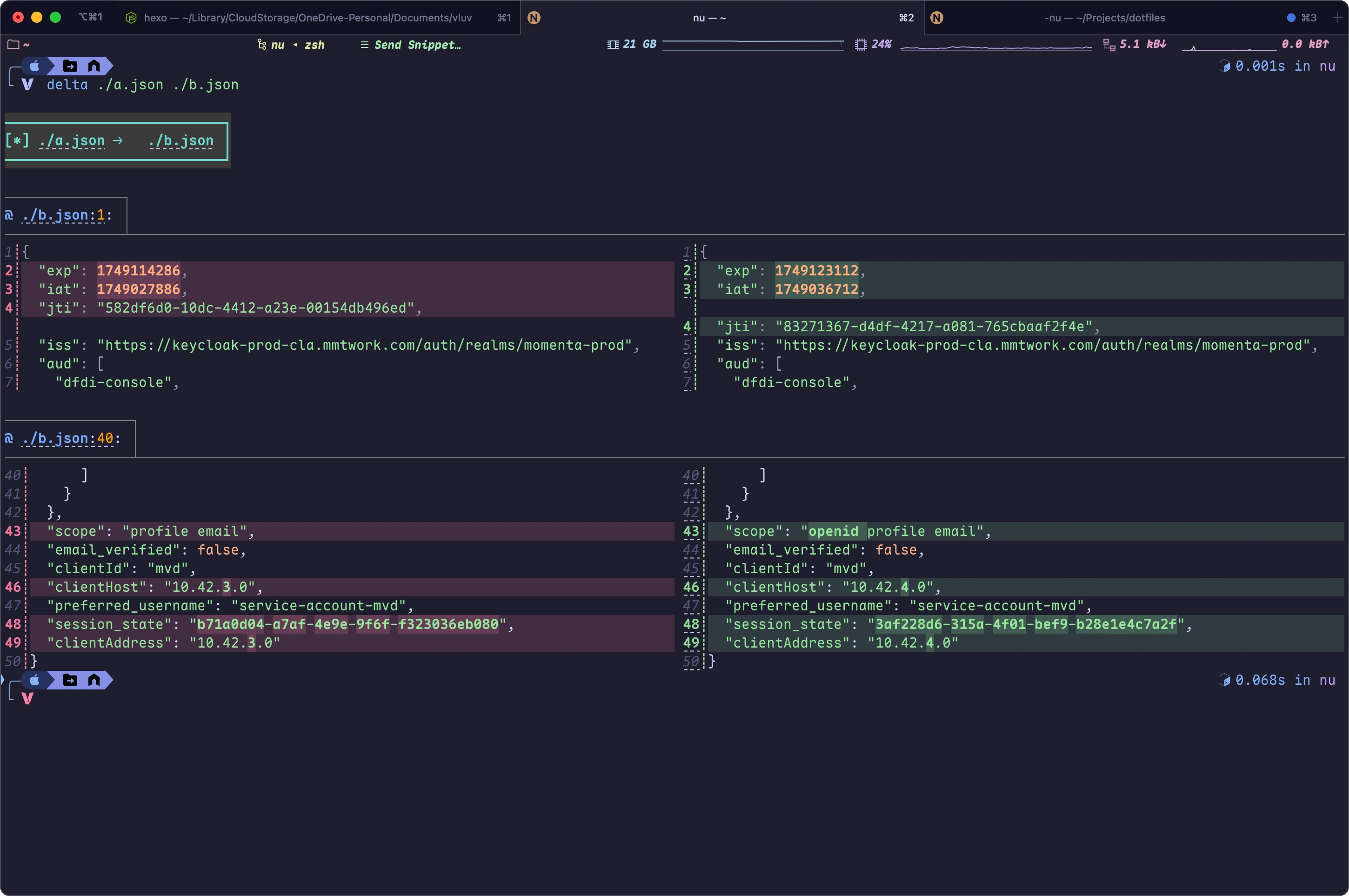
在请求体中添加 scope=openid,确保 Access Token 包含 openid scope。在JSON Web Tokens - jwt.io解码 Access Token 后,可以看到新生成的 Access Token 在scope这个 Claim 中包含了openid
左侧/右侧分别为未包含/包含 openid scope 的 token